
CHOOSING YOUR PLAYER CHARACTERS
- once you have logged into the game at gamestructor.com and you have been to the CHARACTER CARD SET – to allocate the characters and their number for each of the players – you can go to the “people” icon – on the top right hand corner of the screen to select the player who’s turn it is to play
- Each player rolls the dice once – to do this click dice – select the number dice from the drop down (if there is more than one dice in the game)
- click roll dice and you will see the result at the top of the screen
- once a player has finished their turn – click the END TURN icon – under the “people” icon
HAND CARDS – REFERS TO THE CARDS EACH PLAYER HAS COLLECTED THROUGHOUT THE GAME
These cards can be PLAYED either face up or face down You can also play a random card from the cards you have collected – but most of the time specific cards will need to be played
These are the characters (player cards) which are moved around the board after each player rolls the dice You may choose a total of eight characters for the LET’S GET HITCHED board game – then the characters are divided into pairs so you have four sets of couples playing the game
GAME INTERFACE INSTRUCTIONS
When all the players have joined the game and you are ready to start – click the START GAME ICON
When the game has finished click the END GAME ICON
if YOU NEED TO CHECK THE RULES OF THE GAME – CLICK THE rules icon
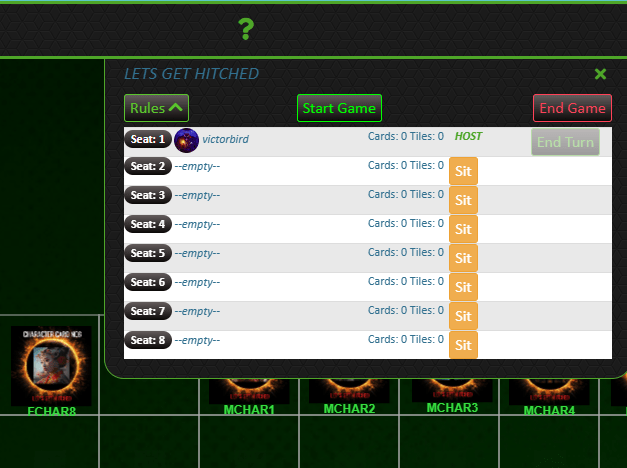
Please note that below END GAME icon there is an END TURN icon – this is clicked to move on to the next player in the game
When you close the pop up box – which shows the player seat positions – you will see the icon above – this is a toggle icon so you can click it again to bring up the player seat positions pop up again
 YOUR RELATIONSHIPS